Search for large files and folders using ncdu
Learn how to use ncdu, a text-based disk utility for Unix systems, to identify and manage large files and folders. It offers a user-friendly interface and options for exporting data in JSON format.
ncdu: NCurses Disk Usage
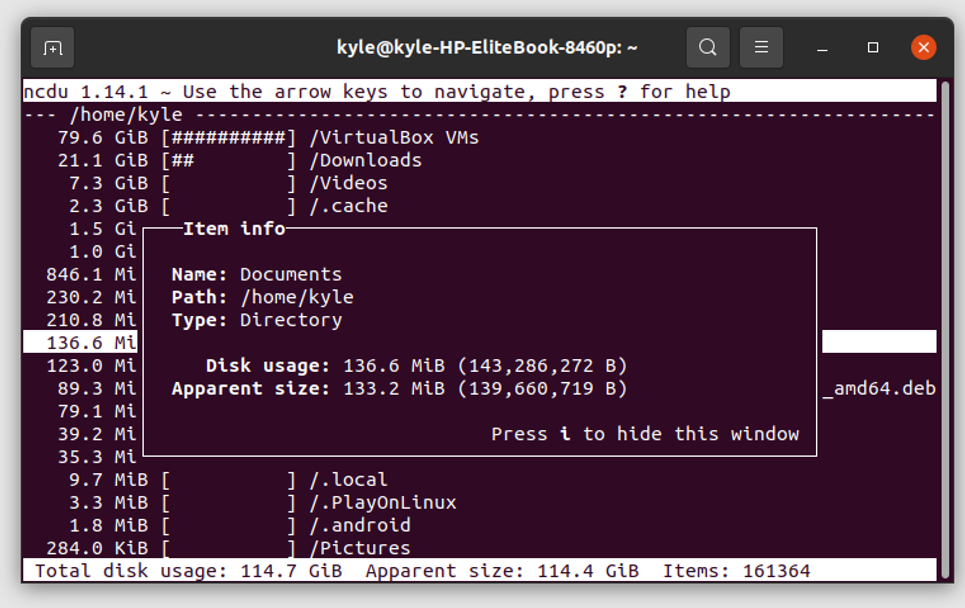
ncdu (NCurses Disk Usage) is a disk utility for Unix systems. It serves a similar purpose to the du utility but features a text-based user interface via the curses programming library. Users can navigate the list using the arrow keys and delete files that are taking up too much space by pressing the 'd' key. From version 1.09 onwards, ncdu can export the file listing in JSON format.
The ncdu package is available in distribution repositories like Debian, Ubuntu, Linux Mint, and their derivatives.
Installation on Ubuntu
apt-get update
apt-get install ncdu
Usage
ncdu <options> <directory>
Options
-h: This help message-q: Quiet mode, refresh interval 2 seconds-v: Print version-x: Same filesystem-r: Read only-o FILE: Export scanned directory to FILE-f FILE: Import scanned directory from FILE-0,-1,-2: UI to use when scanning (0=none, 2=full ncurses)--si: Use base 10 (SI) prefixes instead of base 2--exclude PATTERN: Exclude files that match PATTERN-X, --exclude-from FILE: Exclude files that match any pattern in FILE--exclude-caches: Exclude directories containing CACHEDIR.TAG--confirm-quit: Confirm quitting ncdu
For more information, visit the ncdu official website.
Looking to enhance your Linux infrastructure? At EssingtonITS.co.uk, we offer expert support and tailored solutions to optimise your systems. Let us help you achieve seamless integration and improved performance.
person people found this useful.