API Keys in the eLLM Admin Console
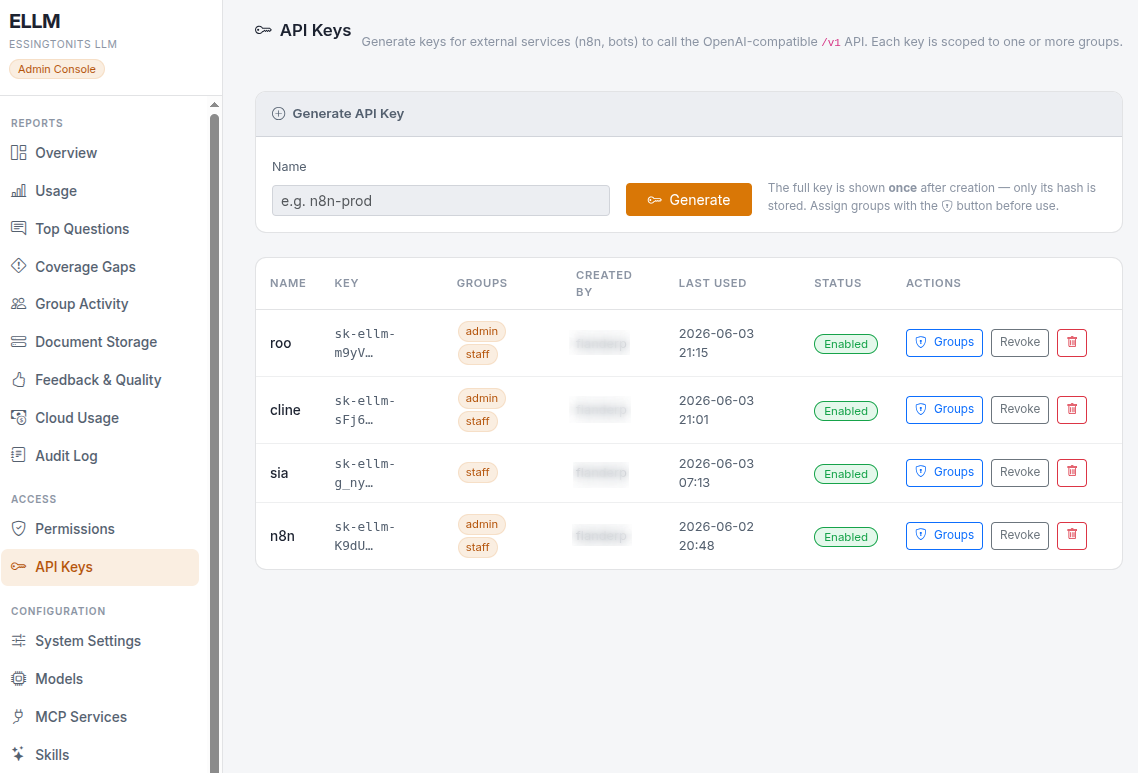
API keys let external software (such as automation tools and bots) use eLLM safely. The API keys page is where administrators create and revoke these keys and decide what each one can access. This article explains how they work and how to manage them.
What this product is for
Sometimes you want another system, rather than a person, to ask eLLM questions, for example an automation that drafts replies or looks up information. An API key gives that system its own credential. Each key is tied to one or more groups, so it can only retrieve and cite the documents those groups are allowed to see, just like a person.
Main features
- Generate keys for external services.
- Map each key to one or more groups, controlling what it can access.
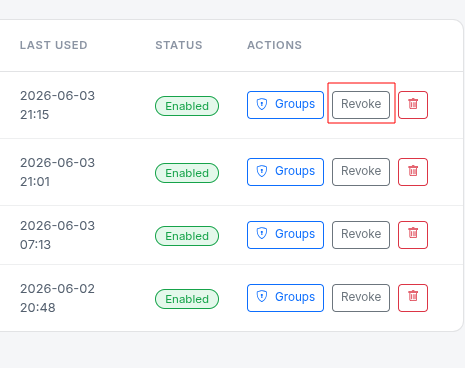
- Revoke a key instantly when it is no longer needed.
- The full key is shown once at creation; only a secured fingerprint is stored.
How to use it
Creating a key
- Open the API Keys page in the admin console.
- Create a new key and choose the group or groups it should belong to.
- Copy the full key shown on screen and store it somewhere safe; it is shown only once.
- Give the key to the external service to use as its credential.
Revoking a key
If a key is no longer needed or may have been exposed, revoke it on the same page. Revocation takes effect immediately, and the key stops working at once.
Common tasks
- Connect an automation tool: create a key, scope it to the right groups, and configure the tool with it.
- Limit what a service can see: map its key only to the groups it needs.
- Retire access: revoke the key.
Things to know
- A key's groups control its access exactly like a person's groups: it can only use documents those groups are allowed to see.
- The full key is shown only once, at creation. Afterwards, only a secured fingerprint is kept, so you cannot retrieve the original later; store it carefully.
- Activity by a key is recorded in the audit log, identified by the key rather than a person.
- Keys are used with the external API. See the External API article for how a connected service uses one.
- Because keys can reach company data from outside, treat them like passwords and revoke any that may be exposed.
Troubleshooting
- I lost a key: you cannot recover the original. Revoke it and create a new one.
- A service can't see expected documents: check the key is mapped to the right groups.
- A key stopped working: it may have been revoked. Create a new one if access is still needed.
Frequently asked questions
What can a key access?
The same documents the groups it is mapped to are allowed to access, no more.
Can I see a key again after creating it?
No. Only a secured fingerprint is stored. Copy the full key when it is shown.
How quickly does revoking work?
Immediately. The key stops working as soon as you revoke it.
Is key activity recorded?
Yes. The audit log records what each key does, identified by the key.
Summary
API keys let external services use ELLM under controlled access. Administrators create a key, scope it to groups, and hand it to the service; the key can only reach what those groups can reach. Keep the key safe since it is shown only once, and revoke it instantly if it is no longer needed.
Need assistance navigating the complexities of eLLM? EssingtonITS offers expert guidance and tailored IT solutions to help you succeed. Visit EssingtonITS.co.uk for comprehensive support.
person people found this useful.